

 MCP
MCPTable of Contents
- Tech Stack
- Prerequisites
- Setup & Installation
- Designing the Data Model
- How Trophy Works
- Setting Up Trophy
- Server Actions
- The Leveling System
- Building the Dashboard
- Logging Workouts
- Implementing Leaderboards
- Building the Achievements Page
- Building the Profile Page
- The Result
Tech Stack
- Framework: Next.js 15 (App Router)
- UI: Shadcn/UI + TailwindCSS
- Icons: Lucide React
- Gamification: Trophy
Prerequisites
- A Trophy account (sign up here).
- Node.js 18+ installed.
Setup & Installation
First, clone the starter repository or create a new Next.js app:.env.local:
Designing the Data Model
For a multi-sport fitness app, we need to normalize efforts. A 10km cycle is not the same as a 10km run. We’ll use three distinct metrics to track raw data, and a unified XP system for progression.
- The Metrics
We will track distance as the primary value.
distance_run(km) - withpaceattribute (walk/run).distance_cycled(km)distance_swum(m) - withstyleattribute (freestyle/breaststroke).
- The Attributes
To enable local leaderboards, we’ll tag every user with a city attribute.
How Trophy Works
Before diving into the code, let’s understand how Trophy powers our gamification layer. In Trophy, Metrics represent different interactions users can make and drive features like Achievements, Streaks, and Emails. When events are recorded for a specific user, any achievements linked to the specified metric will be unlocked if the requirements are met, streaks will be automatically calculated, leaderboards will update, and any configured emails will be scheduled. This is what makes building gamified experiences with Trophy so powerful—it does all the work behind the scenes.Setting Up Trophy
Here’s how we’ll configure Trophy for our fitness app:Create metrics
Create metrics
Head into the Trophy metrics page and create three metrics: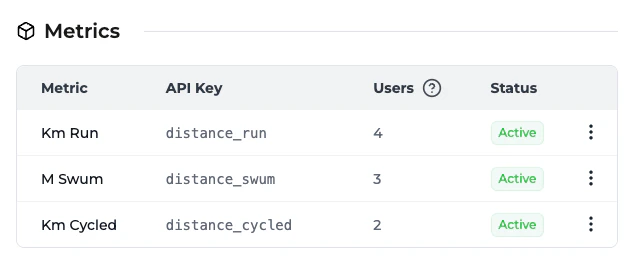
distance_run— Total kilometers rundistance_cycled— Total kilometers cycleddistance_swum— Total meters swum
Create attributes
Create attributes
While still on the metrics page, set up
the pace and style event attributes: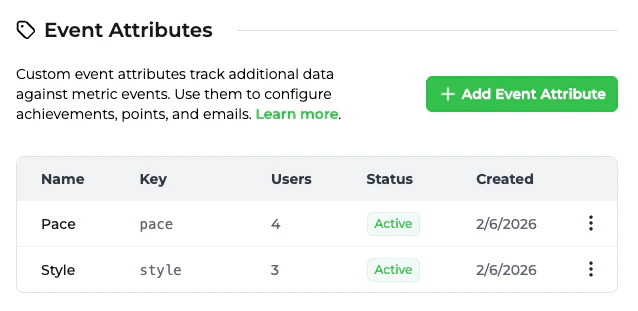 Then, go to the user attributes page
and create the city user atribute:
Then, go to the user attributes page
and create the city user atribute: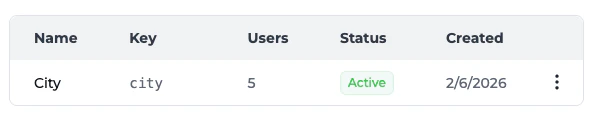
Create achievements
Create achievements
Head into the Trophy achievements page
and create milestone achievements for each sport. For example:Running: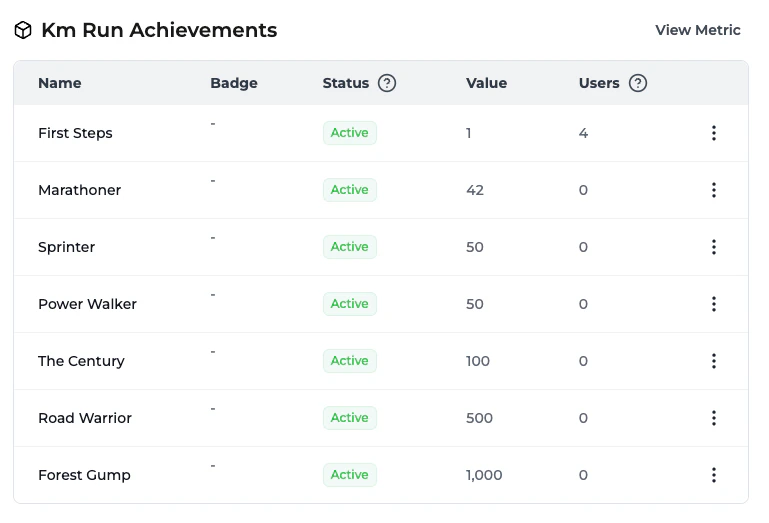
- First 5K (5km total)
- Half Marathon Hero (21.1km total)
- Marathon Master (42.2km total)
- Century Rider (100km total)
- Tour Stage (200km total)
- Pool Regular (1000m total)
- Open Water Ready (5000m total)
Configure leaderboards
Configure leaderboards
Head to the leaderboards page and set up
weekly leaderboards to drive competition. Each leaderboard should be
configured with Repetition Unit: Days and Repetition Interval: 7 to
repeat weekly.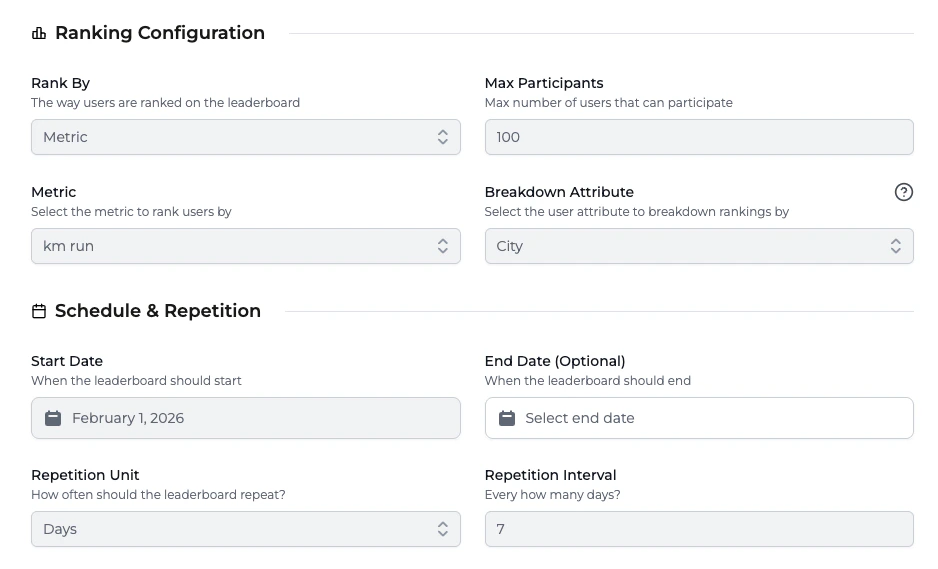 Global leaderboards: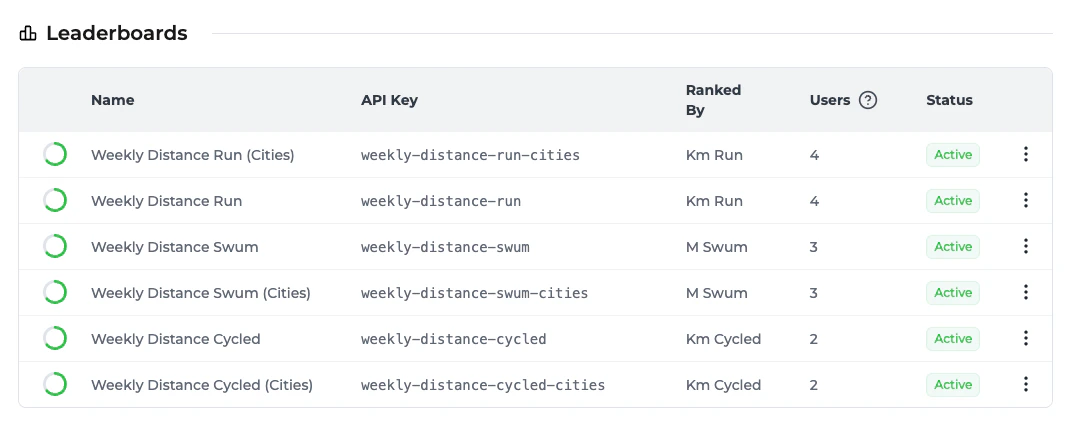
weekly-distance-runweekly-distance-cycledweekly-distance-swum
weekly-distance-run-citiesweekly-distance-cycled-citiesweekly-distance-swum-cities
Set up XP points
Set up XP points
Head to the points page and create a points
system called 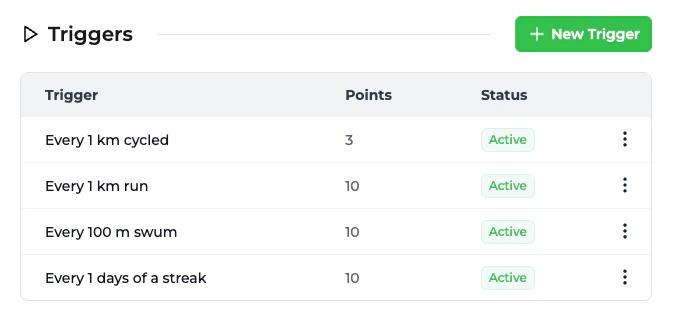 Then configure Points Levels on the same
xp that awards points based on activity:- Running: 10 XP per km
- Cycling: 3 XP per km
- Swimming: 10 XP per 100m
xp system so Trophy can track each user’s tier. Use the keys and thresholds below so the code in this guide lines up with your dashboard:Configure daily streak
Configure daily streak
Head to the streaks page and configure a
daily streak linked to any of the distance metrics. Users will maintain their
streak by logging at least one activity per day.
Configure emails
Configure emails
Head to the emails page and add and activate templates for these automated engagement emails:
- Achievement unlocked — Celebrate new badges
- Streak at risk — Remind users before they lose their streak
- Weekly recap — Summary of progress and leaderboard position
Server Actions
We’ll create asrc/app/actions.ts file to handle all interactions with the Trophy API. This keeps our API keys secure and allows us to leverage Next.js Server Actions.
src/app/actions.ts
The Leveling System
Trophy stores each user’s tier on thexp points system when you configure Points Levels. The user points payload includes a level object. The list levels API returns every tier and threshold so you can show progress toward the next one.
Add a small helper next to your app constants in src/lib/constants.ts:
src/lib/constants.ts
Building the Dashboard
The dashboard aggregates all user stats. We fetch data server-side and derive progress bars from thresholds returned by the API.src/app/page.tsx
LogActivityDialog wrapper around the button—we’ll build that next.
Logging Workouts
The Log Workout button opens a dialog where users select their activity type, enter distance, and submit. This triggers thelogActivity server action which sends the event to Trophy.
First, install the required shadcn/ui components:
components/log-activity-dialog.tsx
User Context
The dialog needs access to the current user ID. Create a context provider:components/user-provider.tsx
layout.tsx:
app/layout.tsx
Helper Utilities
The user context relies on helper functions for managing user identity in localStorage:lib/user.ts
lib/city.ts
Implementing Leaderboards
We’ll build a tabbed interface that allows users to switch between activities (Run/Cycle/Swim) and scopes (Global vs. Local City).src/app/leaderboards/page.tsx
Building the Achievements Page
A dedicated space to show off badges is essential for long-term retention. We’ll use thestats.achievements data to render a grid of badges, visually distinguishing between earned (colorful) and locked (grayscale) states.
src/app/achievements/page.tsx
Building the Profile Page
Finally, the profile page brings it all together. It shows the user’s “Lifetime Stats,” their current XP progression, and allows them to update their settings (like their city).src/app/profile/page.tsx
The Result
You now have a fully functional fitness gamification loop! Users can log workouts across multiple sports, progress through points levels, earn badges, and compete on leaderboards.What You’ve Built
- Multi-sport tracking with normalized XP across running, cycling, and swimming
- Weekly leaderboards with global and city-based competition
- Leveled progression from Rookie to Pro
- Achievement system with milestone badges
- Daily streaks to drive retention
Next Steps
- Connect fitness wearables — Integrate with Strava, Apple Health, or Google Fit to auto-log workouts
- Add social features — Let users follow friends, compare stats, and share achievements
- Build a mobile experience — Convert to a PWA or wrap with Capacitor for app store distribution
- Add push notifications — Alert users when their streak is at risk or they’ve been passed on the leaderboard